
Settings
Open the settings with Preferences in the overflow menu (⋮) of the main screen.
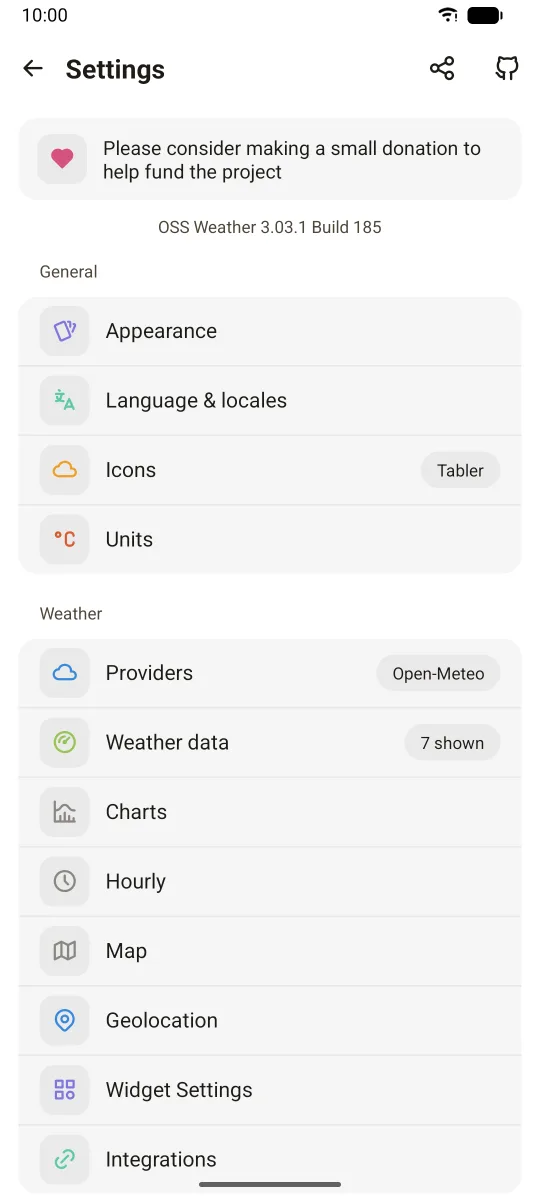
In the modern style, settings are grouped in cards under General, Weather and About. The classic style shows the same entries as a plain list.
General
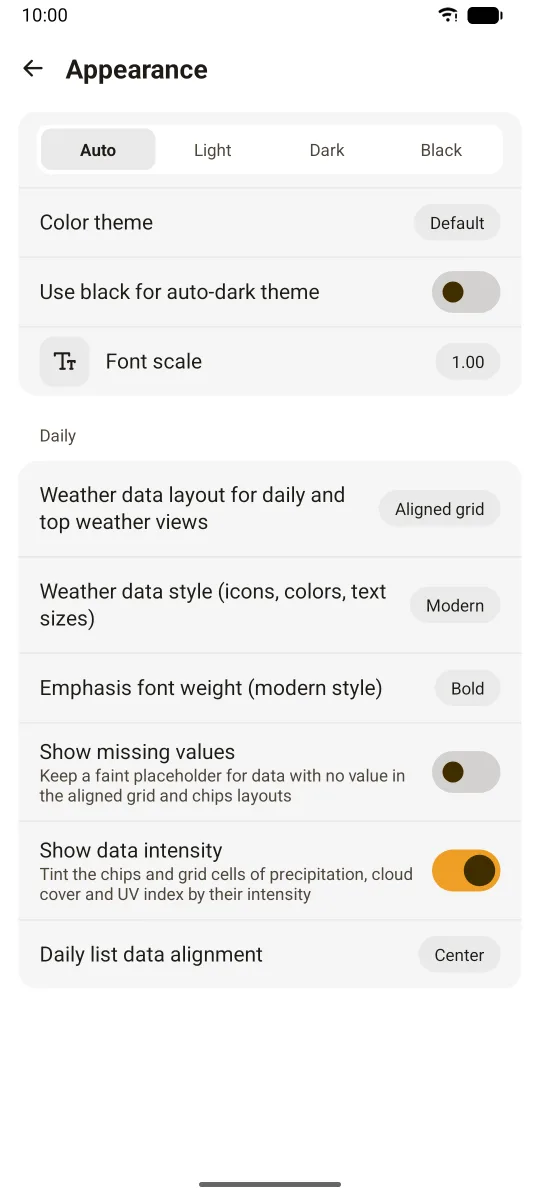
Appearance
- Theme: Auto, Light, Dark or Black. Auto follows the system.
- Color theme: Default, E-Ink, or Dynamic colors (Android 12 and later).
- Use black for auto-dark theme: use the Black theme when Auto switches to dark.
- Font scale: makes the app text larger or smaller.
Under Daily:
- Weather data layout: how values are shown in the top weather view and the daily list.
- Blocks: an icon above each value, in a row.
- Chips: each value in a rounded chip.
- Aligned grid (default): values aligned in columns.
- Weather data style: Modern (default) or Classic. This switches the design style of the app: icons, colors and text sizes.
- Emphasis font weight (modern style): Medium, Semibold or Bold (default).
- Show missing values: keep a faint placeholder for values with no data, in the aligned grid and chips layouts.
- Show data intensity: tint the precipitation, cloud cover and UV index chips or cells by intensity.
- Daily list data alignment: left, center or right.
Language & locales
- Language: "Auto" follows the system, or pick one of the available translations.
- Use 24-hour format
- Daily date format: the date format used in the daily list (dayjs format, default
DD/MM).
Icons
- Icon pack: Tabler (default), Tabler single color, Meteocons, Meteocons Line, Meteocons Eink, WeatherIcons.
- Animations: animated icons, when the icon pack supports it.
Units
- Imperial units: switches all units to imperial. Changing it overrides your custom units.
- Use decimal for temperature (metric)
- Use mm for small cm values: shows mm when a cm value is below 1.
Under Custom units:
| Unit | Choices |
|---|---|
| Temperature | °C, °F |
| Distance | km, mi, m, ft, in |
| Precipitation | mm, cm, in |
| Snow | mm, cm, in |
| Speed | km/h, m/h, m/s, mph, ft/h, ft/s, kn |
| Pressure | hPa |
Weather
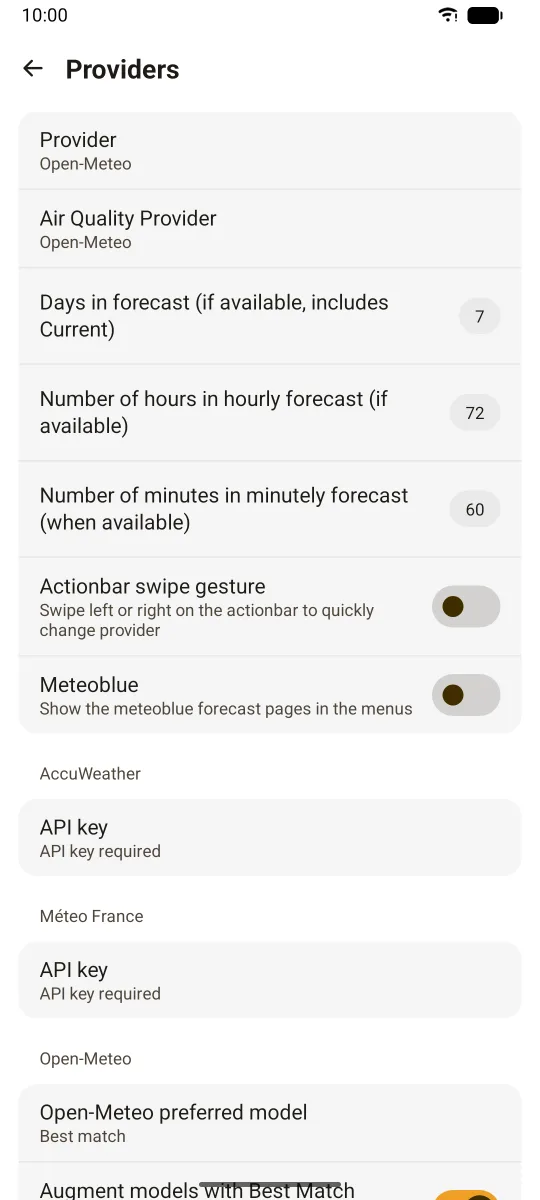
Providers
- Provider: the forecast provider: Open-Meteo (default), Meteo France, OpenWeather or AccuWeather.
- Air Quality Provider: Open-Meteo (default), AccuWeather, or ATMO Auvergne-Rhône-Alpes.
- Days in forecast: 1 to 16 (default 7), when the provider has that many.
- Number of hours in hourly forecast: 12 to 384 (default 72), when available.
- Number of minutes in minutely forecast: 1 to 120 (default 60), when available.
- Actionbar swipe gesture: swipe left or right on the action bar to switch provider (off by default).
- Meteoblue: show the meteoblue forecast pages in the menus (off by default).
Each provider that has options gets its own section:
- AccuWeather: API key.
- Meteo France: API key (optional, a built-in key is used by default).
- Open-Meteo: preferred model, and "augment models with Best Match".
- OpenWeather: API key, and OneCall version (2.5 or 3.0, default 3.0).
See API keys and Weather providers.
Weather data
Choose which values the main screen shows, and in which order. Drag rows between three lists:
- Enabled weather data
- Enabled weather data represented with a small icon (when possible)
- Disabled weather data
Available values include wind speed and gusts, Beaufort scale, precipitation, cloud cover, UV index, moon, snow depth, air quality index, feels like temperature, pressure, humidity, dew point, freezing level, rain/snow limit, and sea data (sea temperature, wave and swell height).
Options above the lists:
- Show current day in daily list
- Show current day data in current weather (like precipitation)
- Show feels like temperature when available
- Always show precipitation probability in the hourly chart
- UV index below won't be shown: hides low UV values.
Charts
- Force charts to show in landscape
- Charts use full height in portrait
Hourly
- Alternate background colors in hourly charts
- Main view hourly display mode: Classic (default), Chart or Windy.
- Number of hours shown in main view hourly chart: default 72.
- Hours visible at once in main view hourly chart: 6, 12, 24 (default), 36 or 48. Scroll to see the other hours.
- Weather data to show on main: drag values between the shown and available lists.
Map
- Weather map source: LibreWXR (default) or MapTiler.
- Animation speed, layer opacity, max time span in hours, show past data, custom tile server.
Under LibreWXR: server URL, color scheme, default layer (radar, satellite, or both), show snow.
Under MapTiler: API key, color scheme, default layer. The MapTiler source needs your own key.
See Weather map.
Geolocation
- Fetch current location when swiping down on main view: pull to refresh also updates your GPS position.
Widget settings (Android)
- Open the app when tapping a widget
- Update frequency: 15 min, 30 min, 1 hour, 2, 4, 6, 12 or 24 hours. It applies to all widgets.
- Update all widgets now
- Widget type defaults: default settings for each widget type.
- One entry per widget on your home screen, to change its own settings.
See Home widgets.
Integrations (Android)
- Enable Gadgetbridge support: sends weather data to your smartwatch through Gadgetbridge. See Smartwatch.
About
- Debugging (store builds): enable crash reports. Reports go to a private Sentry instance and are only used for debugging.
- Third-party libraries: the open-source projects the app uses.
- Send feedback (builds with crash reporting)
- Review the app (store builds)
Backup & restore
- Export settings: saves all settings to a JSON file you choose where to store.
- Import settings: restores settings from an exported file.