
Home Widgets
Weather widgets for your home screen, on Android and iOS.

Widget types
The same six widgets exist on both platforms:
| Widget | Shows | iOS sizes |
|---|---|---|
| Simple Weather | Current weather at a glance | Small, medium |
| Weather with Clock | A live clock with the current weather | Small, medium |
| Weather with Date | The date and location with the current weather | Small, medium |
| Hourly Forecast | The next 24 hours, plus the coming days when tall | Medium, large |
| 7-Day Forecast | The coming days | Medium, large |
| Detailed Forecast | Current weather and forecasts | Large, extra large |
The widgets follow the modern design: weather data chips, temperature curve and precipitation bars, using the same data, order and colors as the app.
Android
- Android widgets are built with Jetpack Glance and can be resized on the home screen.
- When you add a widget, its configuration screen opens first.
- Widgets update in the background at the frequency you set (see below).
iOS
- iOS widgets need iOS 18 or later.
- Add them from the home screen widget gallery, as for any app.
- They are configured from the app, not with "Edit Widget": see Settings > Widget Settings.
Widget options
Per widget
Open Settings > Widget Settings and tap a widget under its type (on Android the same screen opens when you add the widget):
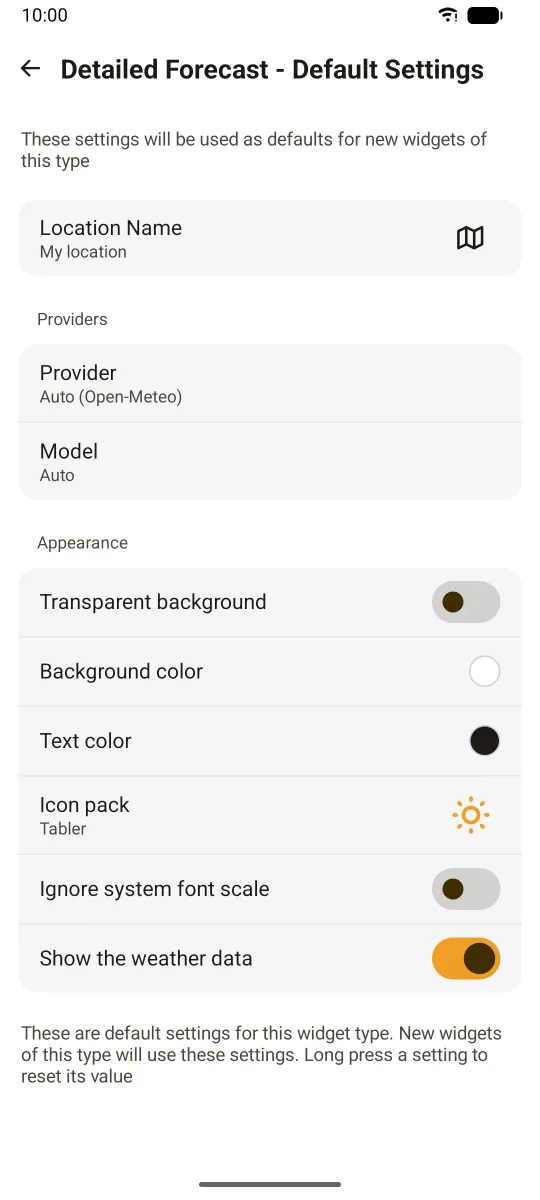
- Location: My location (default). Tap to search a place by name, or use the map button to pick a point. Long press to go back to My location.
- Provider and model: Auto (the app's provider) or a specific one
- Transparent background
- Background color and text color
- Icon pack
- Ignore system font scale
- Widget-specific options:
- Show the weather data (chips): all widgets
- Bold clock and show the hourly forecast: Weather with Clock and Weather with Date
Per widget type
Settings > Widget Settings > Widget Type Defaults sets the default options for each type. New widgets of that type start with them.
For all widgets
In Settings > Widget Settings:
- Open the app when tapping a widget
- Update frequency: 15 or 30 minutes, 1, 2, 4, 6, 12 or 24 hours
- Update All Widgets Now
Widgets also update when the app fetches new weather for their location.