
Weather Data
The main screen shows the current weather, an hourly forecast and a daily forecast for the selected location.
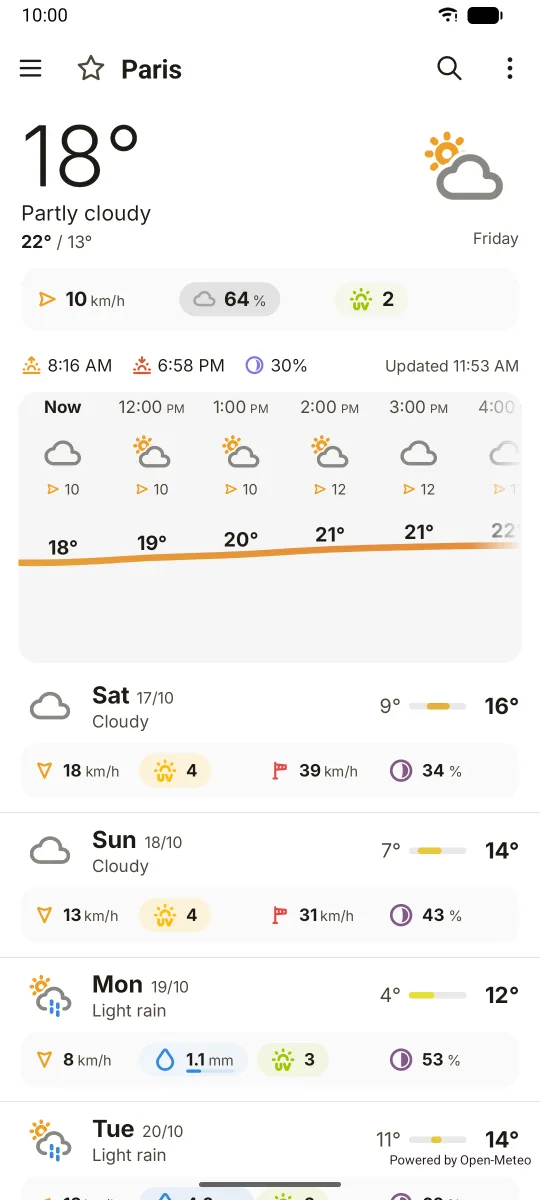
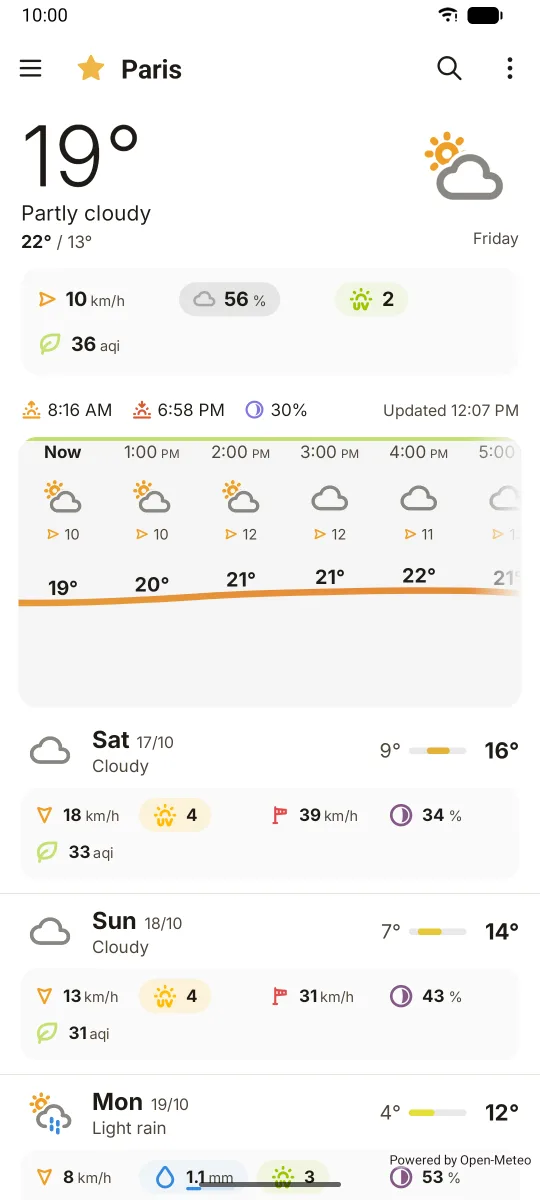
Main screen
From top to bottom:
- Current weather: temperature, weather icon and description. In the modern style the feels-like temperature is shown next to the temperature.
- Weather data: wind, precipitation, cloud cover, UV index, gusts and more, shown as blocks, chips or an aligned grid (Settings > Appearance).
- Next hour precipitation: a short chart of the precipitation expected in the next hour, when the provider gives minute data. The modern style adds a summary such as "precipitation starting in 10 min".
- Sun line: sunrise, sunset and moon illumination, plus the last update time.
- Hourly forecast: a scrolling row of hours. Tap an hour to see all its values. Settings > Hourly lets you switch it to a chart or a "windy" view.
- Daily forecast: one row per day. Tap a day to open its daily page.
Pull down to refresh. If the saved forecast is too old and cannot be updated, the app says the data is outdated and offers a refresh button.
Available weather data
You choose which data is shown, and in which order, in Settings > Weather data:
- Wind speed, wind gusts, Beaufort scale
- Precipitation amount and probability, snow depth
- Cloud cover, UV index
- Feels-like temperature, dew point, relative humidity, sea level pressure
- Freezing level and rain/snow limit (when the provider gives them)
- Moon phase
- Air quality index (off by default, see Air quality)
- Sea temperature, wave height and swell height (with a marine provider)
Weather providers
| Provider | API key | Notes |
|---|---|---|
| Open-Meteo (default) | Not needed | Up to 16 days, about 50 weather models to choose from, next-hour precipitation |
| OpenWeather | Your own key | Next-hour precipitation, weather alerts, One Call API 2.5 or 3.0 |
| Météo-France | Not needed | Next-hour rain, weather warnings |
| AccuWeather | Your own key | 5 days and 12 hours, alerts on paid plans only |
Pick the default provider in Settings > Providers. Each saved location can also use its own provider: open the favorites drawer, tap the menu of a location, then Provider. With Open-Meteo you can also pick a model per location.
Check each provider's own site for its usage limits: Open-Meteo, OpenWeather, Météo-France, AccuWeather. See API keys to set up a key.
Extra sources
- Marine weather: choose MétéoConsult from the main menu (Marine Weather Provider) to add sea data and tides.
- Avalanche bulletins: for locations in the French mountains, the main menu shows a BRA entry that opens the Météo-France avalanche bulletin (PDF). Its API key is set in Settings > Providers > Météo-France.
- meteoblue: enable it in Settings > Providers to add meteoblue forecast pages (weather, meteogram, all-in-one) to the menus.
Forecast length
In Settings > Providers you set:
- Days in the forecast: 1 to 16 (default 7)
- Hours in the hourly forecast: 12 to 384 (default 72)
- Minutes in the next-hour forecast: 1 to 120 (default 60)
The provider can return less than you ask for.
Weather alerts
OpenWeather, Météo-France and AccuWeather (paid plans) give weather alerts. When there are alerts, an alert icon appears in the top bar. Tap it to see them.
Updates and saved data
- The last forecast is kept on the device and shown at launch.
- New data is fetched when you pull to refresh or tap Refresh in the menu, when you change location or provider, and automatically when the saved forecast no longer covers the coming days.
- Settings > Geolocation can also update your GPS location when you pull to refresh.
Privacy
Your location is only sent to the weather services you use. The app has no ads and no tracking. Crash reporting exists only in store builds and can be turned off.