
Daily Forecasts
A forecast for each day ahead, and a detailed page for every day.
Daily list
The main screen lists the coming days, one row per day, with:
- Day and date
- Weather icon and description
- Low and high temperatures (a range bar in the modern style)
- The weather data you enabled: precipitation, wind, UV index and more
The number of days is set in Settings > Providers > Days in forecast: 1 to 16, 7 by default. The provider may return fewer days, for example AccuWeather returns 5.
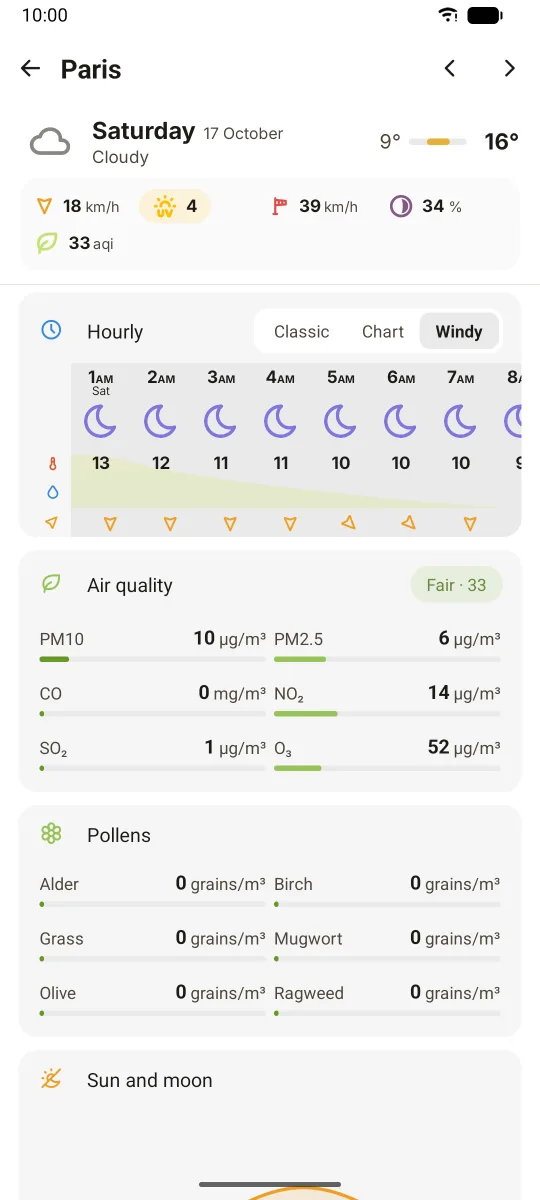
Daily page
Tap a day to open its page. Swipe the header, or use the arrows in the top bar (modern style), to move to the previous or next day.
The page shows, from top to bottom:
- Header: date, icon, description, temperature range and the day's weather data
- Hourly: the hours of that day. In the modern style, tabs switch between the classic, chart and windy views.
- Last 24 hours / next 24 hours: precipitation totals (rain and snow)
- Air quality and pollens: when air quality is enabled, see Air quality
- Tides: when a marine provider is set for the location
- Sun and moon: see Sun and moon
The modern style puts each section in its own card. The classic style shows the same content without cards.
Display options
- Weather data layout (Settings > Appearance): blocks, chips or aligned grid (default)
- Daily view data alignment (Settings > Appearance): left, center or right
- Weather data to show and its order (Settings > Weather data)
- Show current day in daily list and show current day data in current weather (Settings > Weather data)
- Daily date format (Settings > Language & locales)