
Sun and Moon
Each daily page ends with a Sun and moon card showing the course of the sun and moon for that day. Positions and times are calculated on the device for the location.
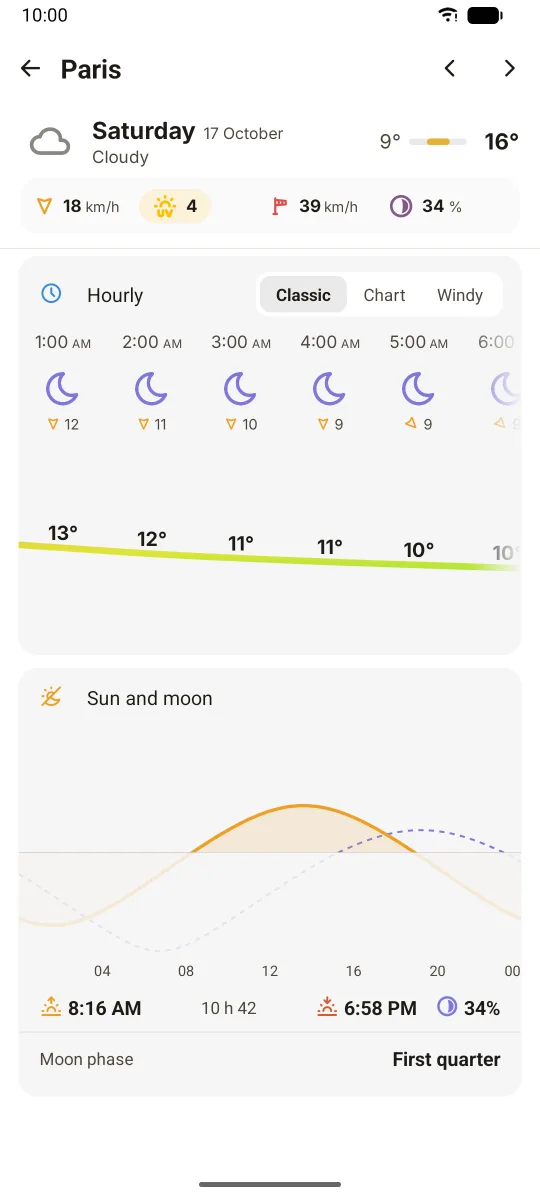
Opening it
Tap a day in the main screen's daily list, then scroll to the bottom of the daily page. The modern style titles the card "Sun and moon", the classic style "Astronomy".
What the card shows
- Sun and moon curves: the height of the sun and of the moon above the horizon through the day. The part below the horizon is shaded.
- Time marker: for today it starts at the current time. Tap or drag along the curves to see another time of the day.
- Sunrise and sunset times
- Day length, and for today the daylight left
- Moon phase name, and in the modern style the moon illumination (in percent)
The classic style also draws a small compass with the direction of the sun and of the moon at the selected time.
The main screen also shows sunrise, sunset and moon illumination on its sun line (modern style).
Settings
- The 12 or 24-hour clock is set in Settings > Language & locales.
- The moon phase can also be shown with the other weather data: enable moon in Settings > Weather data (on by default).